
Sandbox Documentation
In this section, you’ll find essential information about Paperless Sandbox and how to set it up and use it effectively. If you are a first-time user, it is recommended to start with the Getting Started section to familiarize yourself with the basics.
Objective of the document
This document will guide developers and merchants who want to integrate Paperless Payment Gateway to perform real-time transaction verification against relevant services or banks. It will also assist merchants in preparing their infrastructure for integration with Paperless Gateway.
Basic Call Flow
- Merchants need to register for the paperless payment gateway service using a registration form to use the payment gateway service. After successful registration, merchants will get a Merchant ID, Access App Key, Service access user name, and password provided by Paperless Limited which will be usable after the Paperless system admin verifies the merchant
- Customers will place an order like checkout from the merchant’s website.
- All transaction-related data will be stored in the merchant’s database, with an auto-increment unique order_id field. For example, order_id = 105.
- Then merchants have to check the server status to invoke “check-server”.
- Merchant will use the Paperless Provided Merchant ID, Access App Key, Service access user name, password, and transaction-related data to invoke “init-payment-process”. When invoked to “init-payment-process” the Merchant will get a response of a unique token against transaction-related data after authentication & some validation; otherwise, the merchant will get an error code and message.
- The merchant will forward a URL using the GET method with that token and the Customer will confirm the payment.
- After completing a successful or failed transaction it will forward to the merchant callback URL using the POST method with that token, transaction status, and merchant order ID.
- Don’t trust these parameters. The merchant must recheck the transaction status to invoke “check-payment” with the Merchant ID, Access App Key, Service access user name, password, and that token.
- The merchant will get a response about that transaction status
- Depending on the provided status, it can be updated in your database with that order_id.Example: order_id = 105
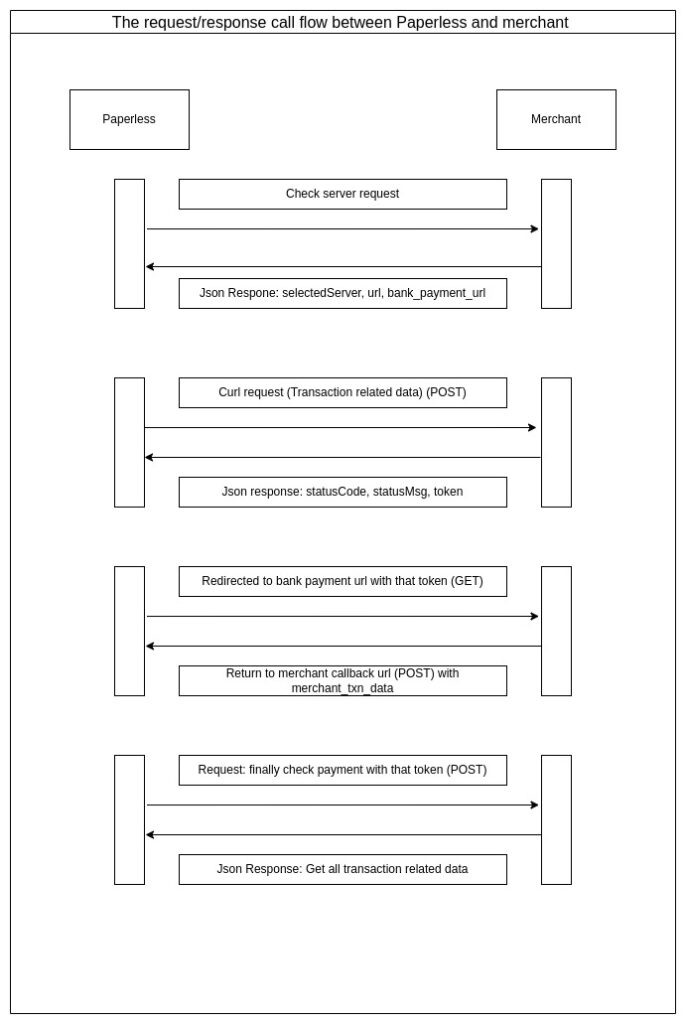
The request/response call flow between Paperless and the merchant is shown in the diagram below
Check Server Status
Endpoint: https://payment-sandbox.paperlessltd.com/api/v1/gateway/check-server
Method: ‘GET’
Description: this will provide the two URLs that are needed to complete the payment journey
initiate_payment_url – For generating a token
gateway_url – For redirecting to the payment gateway
Response:
Request For Payment
Endpoint: response got from section 3 – param “initiate_payment_url”
Method: ‘POST’
Description:
Before initiating a transaction a merchant needs to request the Token
					{
  "selectedServer": true,
  "initiate_payment_url": "https://payment-sandbox.paperlessltd.com/api/v1/gateway/payment-process/initiate",
  "gateway_url": "https://checkout-sandbox.paperlessltd.com/payment-process/{$token}"
}
Request Parameters
|
Parameters
|
Mandatory
|
Description
|
Sample Value
|
|---|---|---|---|
|
muid
|
Yes
|
Merchant Unique Identifier (provided by system)
|
PAPERLESS6690ed68d63ea
|
|
access_app_key
|
Yes
|
Access App Key ((provided by system))
|
CwtC2ALfYoprlKruITl2UsAhyMUh0g1ey5Gt660b
|
|
merchant_order_id
|
Yes
|
Merchant Order ID
|
105
|
|
merchant_ref_id
|
Yes
|
Merchant Reference ID
|
571607886240c
|
|
customer_name
|
Yes
|
Customer Name
|
Michel Schofield
|
|
customer_email
|
Yes
|
Customer Email
|
schofield@gmail.com
|
|
customer_add
|
No
|
Customer Address
|
House:01,Road:08,Nikunja-2,Dhaka-1229
|
|
customer_phone
|
Yes
|
Customer Phone
|
01910000000
|
|
customer_city
|
No
|
Customer City
|
Dhaka
|
|
customer_postcode
|
No
|
Customer Postcode
|
1229
|
|
customer_country
|
No
|
Customer Country
|
Bangladesh
|
|
shipping_name
|
No
|
Shipping Name
|
Linking Burrows
|
|
shipping_email
|
No
|
Shipping Email
|
test@test.com
|
|
shipping_add
|
No
|
Shipping Address
|
House:01,Road:08,Nikunja-2,Dhaka-1229
|
|
shipping_city
|
No
|
Shipping City
|
Dhaka
|
|
shipping_postCode
|
No
|
Shipping Postcode
|
1600
|
|
shipping_country
|
No
|
Shipping Country
|
Bangladesh
|
|
product_desc
|
Yes
|
Product Description
|
{2 X Pendrive [800]=[1600]} {1 X Mouse [700]=[700]} {shipping rate:40.00}-{discountamount:0.00}=2340.00}
|
|
amount
|
Yes
|
Amount
|
2340
|
|
currency
|
Yes
|
Currency
|
BDT
|
|
approve_url
|
Yes
|
Approve URL (post request)
|
https://www.approve.com
|
|
cancel_url
|
Yes
|
Cancel URL (post request)
|
https://www.cancel.com
|
|
decline_url
|
Yes
|
Decline URL (post request)
|
https://www.decline.com
|
Request Response
					{
    "statusCode": "1000",
    "statusMsg": "Success",
    "token": "e8f649c2-da42-4088-8795-9e2e4c7dd05f",
    "merchant_callback_url_update": true
    }
Forwarding URL
Endpoint: response got from section 3 – param “gateway_url”
Method: ‘GET’
Description:
After receiving the token, the merchant will forward it to the gateway_url (got from section 3) URL using the get method. Then complete the payment process

Merchant Callback
After completing a successful or failed transaction it will make a post request to the merchant callback URL with the “merchant_txn_data” key.
Method: ‘POST’
Key: “merchant_txn_data” (Receive post data using this key)
Value:
					{
  "merchant_txn_data": {
    "amount": "1",
    "currency": "BDT",
    "merchant_order_id": "1231312",
    "token": "4adfe624-6839-4baa-91e8-9b3ba1c547f4",
    "txn_status": "1009"
  }
}
Check Payment Status
Endpoint: https://payment-sandbox.paperlessltd.com/api/v1/gateway/check-payment
Method: ‘POST’
Description:
merchant must verify payment info using check payment API
Request Parameter
|
Field Name
|
Description
|
Sample Value
|
|---|---|---|
|
muid
|
Merchant Unique Identifier
|
PAPERLESS6690ed68d63ea
|
|
token
|
Token generated in section 4
|
CwtC2ALfYoprlKruITl2UsAhyMUh0g1ey5Gt660b
|
Response
					{
    "muid": "PAPERLESS6669a686c0285",
    "ref_id": "uTCPZCc79yCw72jN",
    "token": "b42493d7-8b84-4a6a-8ee4-6ba9d56b7297",
    "merchant_req_amount": "1000.00",
    "merchant_ref_id": "f927EInEFzUqWGsi",
    "merchant_currency": "BDT",
    "merchant_amount_bdt": "1000.00",
    "conversion_rate": "1.00",
    "service_ratio": "10.00",
    "card_charge_bdt": "50.00",
    "emi_ratio": "0.00",
    "emi_charge": "0.00",
    "bank_amount_bdt": "1050.00",
    "discount_bdt": "0.00",
    "merchant_order_id": "1231312",
    "request_ip": "10.42.6.185",
    "txn_status": 1009,
    "extra_json": null,
    "card_details": null,
    "is_foreign": 0,
    "payment_card": "City Visa",
    "card_code": 3001,
    "payment_method": "5001",
    "init_time": "2024-07-27 05:06:31",
    "txn_time": "2024-07-27 05:06:53",
    "statusCode": 1000,
    "customer_details": "{\"customer_name\":\"arush\",\"customer_email\":\"tabidhasan003@gmail.com\",\"customer_add\":\"12 Nikunju\",\"customer_city\":\"Dhaka\",\"customer_state\":null,\"customer_country\":\"Bangladesh\",\"customer_postcode\":\"1207\",\"customer_phone\":\}"
    }
Transaction Status Codes
|
txn_status
|
message
|
Interpretation
|
|---|---|---|
|
1000
|
Successful Transaction
|
Transaction SUCCESS
|
|
1001
|
Transaction Failure
|
Transaction DECLINE
|
|
1009
|
Transaction Failure
|
Transaction CANCELED
|
|
NULL
|
Transaction Failure
|
Transaction ATTEMPT
|
Sample Source Code
					<?php

use Illuminate\Support\Facades\Http;
use Illuminate\Support\Facades\Cache;
use Exception;


class PaymentGateway
{
    private string $generateTokenUrl, $paymentRedirectUrl;

    public function checkServer()
    {
        $checkServerUrl = 'https://payment-sandbox.paperlessltd.com/api/v1/gateway/check-server';
        $response = Http::get($checkServerUrl);
        $resBody = $response->json();

        $this->generateTokenUrl = $resBody['url'];
        $this->paymentRedirectUrl = $resBody['bank_payment_url'];
    }

    public function generatePaymentToken(array $formData): ?string
    {

        $response = Http::asForm()->post($this->generateTokenUrl, $formData);
        $resBody = $response->json();

        return $resBody['token'];
    }

    public function redirectToPGW($token)
    {
        $url = $this->paymentRedirectUrl . '/' . $token;
        header('Location: ' . $url);
        exit();
    }

    public function checkPaymentStatus($muid, $token)
    {
        $url = 'https://payment-sandbox.paperlessltd.com/api/v1/gateway/check-server';


        $response = Http::asForm()->post($url, [
            'muid' => $muid,
            'token' => $token
        ]);

        return $response->json();
    }
}

// Example
$paymentGateway = new PaymentGateway();

// Check server
$paymentGateway->checkServer();

// Generate payment token
$formData = [
    'muid' => 'PAPERLESS6690ed68d63ea', // will be given by paperless
    'access_app_key' => 'CwtC2ALfYoprlKruITl2UsAhyMUh0g1ey5Gt660b', // will be given by paperless
    'merchant_order_id' => '105',
    'merchant_ref_id' => '571607886240c',
    'customer_name' => 'Michel Schofield',
    'customer_email' => 'schofield@gmail.com',
    'customer_add' => 'House:01,Road:08,Nikunja-2,Dhaka-1229',
    'customer_phone' => '01910000000',
    'customer_city' => 'Dhaka',
    'customer_postcode' => '1229',
    'customer_country' => 'Bangladesh',
    'shipping_name' => 'Linking Burrows',
    'shipping_email' => 'test@test.com',
    'shipping_add' => 'House:01,Road:08,Nikunja-2,Dhaka-1229',
    'shipping_city' => 'Dhaka',
    'shipping_postCode' => '1600',
    'shipping_country' => 'Bangladesh',
    'product_desc' => '{2 X Pendrive [800]=[1600]} {1 Mouse [700]=[700]} {shipping rate:40.00}-{discount amount:0.00}=2340.00}',
    'amount' => '2340',
    'currency' => 'BDT',
    'approve_url' => 'https://www.approve.com', // post-request
    'cancel_url' => 'https://www.cancel.com', // post-request
    'decline_url' => 'https://www.decline.com', // post-request
];

$token = $paymentGateway->generatePaymentToken($formData);


// Redirect to gateway
$paymentGateway->redirectToPGW($token);


//after successful or failed execution the server will send the mentioned data to the callback URL
{
"merchant_txn_data": "{\"token\":\"5019e350-f6ba-44fc-8538-72643d3c8eec\",\"txn_status\":1000,\"merchant_order_id\":\"1231312\"}"
}

// Check payment status
$muid = 'PAPERLESS6690ed68d63ea';
$token = 'd8fc9fda-7dd8-4769-99c0-918a6f3155ad'; //token (merchant_txn_data->token) sent to the callback url


$paymentStatus = $paymentGateway->checkPaymentStatus($muid, $token);
if ($paymentStatus) {
    print_r($paymentStatus);
} else {
    echo "Failed to check payment status.\n";
}
Table of Contents
Objective of the document
This document will guide developers and merchants who want to integrate Paperless Payment Gateway to perform real-time transaction verification against relevant services or banks. It will also assist merchants in preparing their infrastructure for integration with Paperless Gateway.
Basic Call Flow
- Merchants need to register for the paperless payment gateway service using a registration form to use the payment gateway service. After successful registration, merchants will get a Merchant ID, Access App Key, Service access user name, and password provided by Paperless Limited which will be usable after the Paperless system admin verifies the merchant
- Customers will place an order like checkout from the merchant’s website.
- All transaction-related data will be stored in the merchant’s database, with an auto-increment unique order_id field. For example, order_id = 105.
- Then merchants have to check the server status to invoke “check-server”.
- Merchant will use the Paperless Provided Merchant ID, Access App Key, Service access user name, password, and transaction-related data to invoke “init-payment-process”. When invoked to “init-payment-process” the Merchant will get a response of a unique token against transaction-related data after authentication & some validation; otherwise, the merchant will get an error code and message.
- The merchant will forward a URL using the GET method with that token and the Customer will confirm the payment.
- After completing a successful or failed transaction it will forward to the merchant callback URL using the POST method with that token, transaction status, and merchant order ID.
- Don’t trust these parameters. The merchant must recheck the transaction status to invoke “check-payment” with the Merchant ID, Access App Key, Service access user name, password, and that token.
- The merchant will get a response about that transaction status
- Depending on the provided status, it can be updated in your database with that order_id.Example: order_id = 105
The request/response call flow between Paperless and the merchant is shown in the diagram below

Check Server Status
Endpoint: https://payment-sandbox.paperlessltd.com/api/v1/gateway/check-server
Method: ‘GET’
Description: this will provide the two URLs that are needed to complete the payment journey
initiate_payment_url – For generating a token
gateway_url – For redirecting to the payment gateway
Response:
					{
    "selectedServer": true,
    "initiate_payment_url":   "https://payment-sandbox.paperlessltd.com/api/v1/gateway/payment-process/initiate",
    "gateway_url":    "https://payment-sandbox.paperlessltd.com/api/v1/gateway/payment-process/{token}"
}
Request For Payment
Endpoint: response got from section 3 – param “initiate_payment_url”
Method: ‘POST’
Description:
Before initiating a transaction a merchant needs to request the Token
Request Parameters
|
Parameters
|
Mandatory
|
Description
|
Sample Value
|
|---|---|---|---|
|
muid
|
Yes
|
Merchant Unique Identifier (provided by system)
|
PAPERLESS6690ed68d63ea
|
|
access_app_key
|
Yes
|
Access App Key ((provided by system))
|
CwtC2ALfYoprlKruITl2UsAhyMUh0g1ey5Gt660b
|
|
merchant_order_id
|
Yes
|
Merchant Order ID
|
105
|
|
merchant_ref_id
|
Yes
|
Merchant Reference ID
|
571607886240c
|
|
customer_name
|
Yes
|
Customer Name
|
Michel Schofield
|
|
customer_email
|
Yes
|
Customer Email
|
schofield@gmail.com
|
|
customer_add
|
No
|
Customer Address
|
House:01,Road:08,Nikunja-2,Dhaka-1229
|
Request Response
					{
    "statusCode": "1000",
    "statusMsg": "Success",
    "token": "e8f649c2-da42-4088-8795-9e2e4c7dd05f",
    "merchant_callback_url_update": true
}
Forwarding URL
Endpoint: response got from section 3 – param “gateway_url”
Method: ‘GET’
Description:
After receiving the token, the merchant will forward it to the gateway_url (got from section 3) URL using the get method. Then complete the payment process
Merchant Callback
After completing a successful or failed transaction it will make a post request to the merchant callback URL with the “merchant_txn_data” key.
Method: ‘POST’
Key: “merchant_txn_data” (Receive post data using this key)
Value:
					{
    "merchant_txn_data": "{\"token\":\"5019e350-f6ba-44fc-8538-72643d3c8eec\",\"txn_status\":1000,\"merchant_order_id\":\"1231312\"}"
}
Check Payment Status
Endpoint: https://payment-sandbox.paperlessltd.com/api/v1/gateway/check-payment
Method: ‘POST’
Description:
merchant must verify payment info using check payment API
Request Parameter
|
Field Name
|
Description
|
Sample Value
|
|---|---|---|
|
muid
|
Merchant Unique Identifier
|
PAPERLESS6690ed68d63ea
|
|
token
|
Token generated in section 4
|
CwtC2ALfYoprlKruITl2UsAhyMUh0g1ey5Gt660b
|
Response
					{
    "muid": "PAPERLESS6669a686c0285",
    "ref_id": "uTCPZCc79yCw72jN",
    "token": "b42493d7-8b84-4a6a-8ee4-6ba9d56b7297",
    "merchant_req_amount": "1000.00",
    "merchant_ref_id": "f927EInEFzUqWGsi",
    "merchant_currency": "BDT",
    "merchant_amount_bdt": "1000.00",
    "conversion_rate": "1.00",
    "service_ratio": "10.00",
    "card_charge_bdt": "50.00",
    "emi_ratio": "0.00",
    "emi_charge": "0.00",
    "bank_amount_bdt": "1050.00",
    "discount_bdt": "0.00",
    "merchant_order_id": "1231312",
    "request_ip": "10.42.6.185",
    "txn_status": 1009,
    "extra_json": null,
    "card_details": null,
    "is_foreign": 0,
    "payment_card": "City Visa",
    "card_code": 3001,
    "payment_method": "5001",
    "init_time": "2024-07-27 05:06:31",
    "txn_time": "2024-07-27 05:06:53",
    "statusCode": 1000,
    "customer_details": "{\"customer_name\":\"arush\",\"customer_email\":\"tabidhasan003@gmail.com\",\"customer_add\":\"12 Nikunju\",\"customer_city\":\"Dhaka\",\"customer_state\":null,\"customer_country\":\"Bangladesh\",\"customer_postcode\":\"1207\",\"customer_phone\":\}"
}
Transaction Status Codes
|
txn_status
|
message
|
Interpretation
|
|---|---|---|
|
1000
|
Successful Transaction
|
Transaction SUCCESS
|
|
1001
|
Transaction Failure
|
Transaction DECLINE
|
|
1009
|
Transaction Failure
|
Transaction CANCELED
|
|
NULL
|
Transaction Failure
|
Transaction ATTEMPT
|
Sample Source Code
					<?php

use Illuminate\Support\Facades\Http;
use Illuminate\Support\Facades\Cache;
use Exception;


class PaymentGateway
{
    private string $generateTokenUrl, $paymentRedirectUrl;

    public function checkServer()
    {
        $checkServerUrl = 'https://paperless-payment-sandbox.dev-polygontech.xyz/api/v1/gateway/check-server';
        $response = Http::get($checkServerUrl);
        $resBody = $response->json();

        $this->generateTokenUrl = $resBody['url'];
        $this->paymentRedirectUrl = $resBody['bank_payment_url'];
    }

    public function generatePaymentToken(array $formData): ?string
    {

        $response = Http::asForm()->post($this->generateTokenUrl, $formData);
        $resBody = $response->json();

        return $resBody['token'];
    }

    public function redirectToPGW($token)
    {
        $url = $this->paymentRedirectUrl . '/' . $token;
        header('Location: ' . $url);
        exit();
    }

    public function checkPaymentStatus($muid, $token)
    {
        $url = 'https://paperless-payment-sandbox.dev-polygontech.xyz/api/v1/gateway/check-payment';


        $response = Http::asForm()->post($url, [
            'muid' => $muid,
            'token' => $token
        ]);

        return $response->json();
    }
}

// Example
$paymentGateway = new PaymentGateway();

// Check server
$paymentGateway->checkServer();

// Generate payment token
$formData = [
    'muid' => 'PAPERLESS6690ed68d63ea', // will be given by paperless
    'access_app_key' => 'CwtC2ALfYoprlKruITl2UsAhyMUh0g1ey5Gt660b', // will be given by paperless
    'merchant_order_id' => '105',
    'merchant_ref_id' => '571607886240c',
    'customer_name' => 'Michel Schofield',
    'customer_email' => 'schofield@gmail.com',
    'customer_add' => 'House:01,Road:08,Nikunja-2,Dhaka-1229',
    'customer_phone' => '01910000000',
    'customer_city' => 'Dhaka',
    'customer_postcode' => '1229',
    'customer_country' => 'Bangladesh',
    'shipping_name' => 'Linking Burrows',
    'shipping_email' => 'test@test.com',
    'shipping_add' => 'House:01,Road:08,Nikunja-2,Dhaka-1229',
    'shipping_city' => 'Dhaka',
    'shipping_postCode' => '1600',
    'shipping_country' => 'Bangladesh',
    'product_desc' => '{2 X Pendrive [800]=[1600]} {1 Mouse [700]=[700]} {shipping rate:40.00}-{discount amount:0.00}=2340.00}',
    'amount' => '2340',
    'currency' => 'BDT',
    'approve_url' => 'https://www.approve.com', // post-request
    'cancel_url' => 'https://www.cancel.com', // post-request
    'decline_url' => 'https://www.decline.com', // post-request
];

$token = $paymentGateway->generatePaymentToken($formData);


// Redirect to gateway
$paymentGateway->redirectToPGW($token);


//after successful or failed execution the server will send the mentioned data to the callback URL
{
"merchant_txn_data": "{\"token\":\"5019e350-f6ba-44fc-8538-72643d3c8eec\",\"txn_status\":1000,\"merchant_order_id\":\"1231312\"}"
}

// Check payment status
$muid = 'PAPERLESS6690ed68d63ea';
$token = 'd8fc9fda-7dd8-4769-99c0-918a6f3155ad'; //token (merchant_txn_data->token) sent to the callback url


$paymentStatus = $paymentGateway->checkPaymentStatus($muid, $token);
if ($paymentStatus) {
    print_r($paymentStatus);
} else {
    echo "Failed to check payment status.\n";
}